New Feature in the WebSelf Footer

Easily Manage Your Footer Links With WebSelf
The footer is a section of a website that is often overlooked. Located at the very bottom of each page, it is easy to assume that no one will scroll that far, or to use it only for legal information. And yet, the footer has real potential when it comes to improving navigation and search engine optimization. It allows you to add links to important pages on your site, helping strengthen your internal linking structure.
However, in many online website builders, adding hyperlinks to the footer is not always intuitive. That is exactly why WebSelf has launched a new feature to make the process easier.
Manage Your Footer Links Directly in WebSelf
Adding internal links to your footer has never been faster. From the WebSelf site editor, you can now select, organize, and edit your footer links in just a few clicks, without having to work with text blocks or use advanced settings such as code, all while respecting the theme already established in your design.
How to Access the Feature
The feature is located directly in the interface used to edit your site. To access it, log in to your WebSelf account, then click the “Edit your site” button from your dashboard. Once you are in the editor, scroll to the bottom of the screen to find your footer.
How to Add Links to Your Pages
To add links to existing pages on your site, click on your footer. The options below will appear.
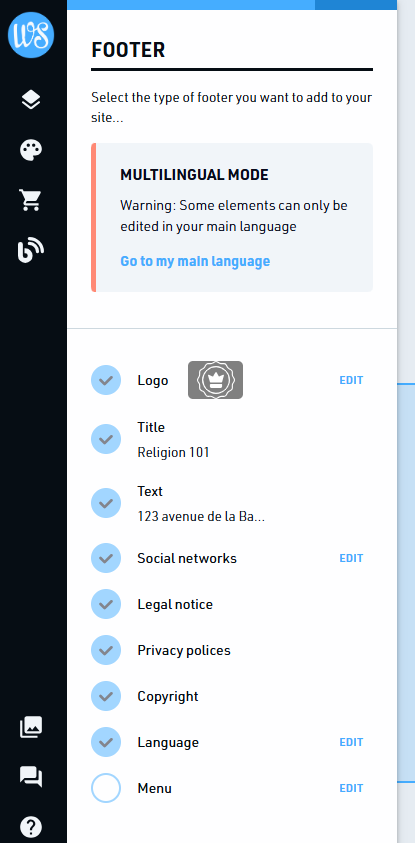
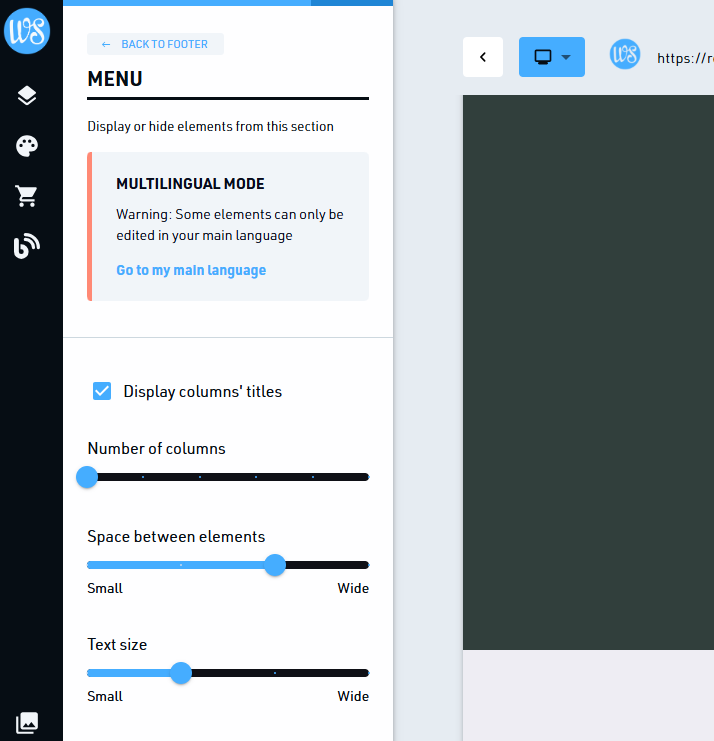
Check “Menu,” then click “Edit” to adjust the layout of your footer. You can choose the number of text columns, the spacing between elements, and the text size.
Then, to add a link to a page, simply click the “+ Add a page” text under the title of the column of your choice. A box will then appear, allowing you to quickly select the page from all the ones you have already created. You do not need to add the hyperlink yourself, as it is automatically inserted when you select the page. It will also update on its own if the page URL changes over time.
To delete a link, hover over it without clicking: options will appear. The trash can will remove the link from the column, while the arrows will move the item up or down.
How to Organize Your Links
If your footer is busy, it is worth organizing the information it contains in a clear hierarchy. To do this, group page links under thematic labels to make them easier to read. For example, in a column titled with your company name, you could include a link to your About page, the page introducing your team, and the one listing your job openings.
Why You Should Pay Attention to the Internal Links in Your Footer
This space is a strategic place to include internal links. Since most businesses include similar elements there, users often scroll to the bottom of the page to find, among other things, links to your social media, your shipping and return policy, or information about your team. By giving visitors relevant information they are actually looking for, you improve their experience with your business.
Adding links to your footer therefore helps improve your internal linking structure. It is a simple action, but one that can significantly optimize your search engine optimization (SEO). This structure connects your pages to one another, helping both search engines and users explore and understand your website’s content.
Which Links Should You Add to Your Website Footer?
Even though adding internal links to your footer can improve your SEO, it is important not to overload it. Focus on the main pages of your site, such as your shop, portfolio, and contact form. Do not forget to include legal pages, such as your terms and conditions and privacy policy.
Also avoid reproducing your main menu identically. The footer should complement the navigation in your site header, not duplicate it: repeating the same links weakens their SEO weight and does not provide anything new for visitors looking for information they did not find higher up.
Your footer deserves attention. By taking care of the links it contains, you improve both your SEO and the experience of your visitors and customers. Plus, with WebSelf’s new feature, it is easier than ever to do.

Roxane has always written and dreamed of making a living from her pen. Now a web editor, proofreader and author, we can say that it's mission accomplished!